
Transitioning to a digital spare parts inventory is a strategic overhaul of risk and cost management, not a simple technology swap.
- Holding physical spares is an escalating financial liability, costing up to 25% of the inventory’s value each year in hidden expenses.
- A digital-first approach transforms these dead assets into dynamic files, enabling on-demand production that dramatically cuts lead times and storage costs.
Recommendation: Begin by auditing your existing inventory not for what is easy to print, but for what is most economically painful to hold.
As a spare parts manager, you know the sight all too well: shelves lined with parts, gathering dust, representing millions in tied-up capital. This is the “just-in-case” inventory—a necessary evil to prevent costly downtime. The common refrain you hear is to “just 3D print them” and eliminate the warehouse. While attractive, this advice often misses the point entirely. Simply replacing a physical part with a printed one is a tactic, not a strategy. It solves one problem while potentially creating new ones related to performance, cost, and legal compliance.
The real revolution isn’t in the printer itself, but in fundamentally rethinking inventory as a liability rather than an asset. The shift from a physical warehouse to a digital one is a profound strategic discipline. It involves a rigorous analysis of cost, a deep understanding of material science, and a clear-eyed approach to intellectual property. The goal is not just to print a part on demand; it’s to systematically de-risk your entire supply chain by converting stagnant physical assets into flexible, verifiable digital files.
This article provides the strategic framework to move beyond the hype. We will dissect the true cost of physical inventory, establish a method for identifying the right parts to digitize, navigate the technical and legal complexities, and ultimately demonstrate how to build a robust, cost-effective digital spare parts program that delivers tangible ROI.
Summary: A Strategic Guide to On-Demand Spare Parts via Digital Inventory
- Why holding obsolete spare parts costs 25% of their value per year?
- How to identify which 10% of your spare parts are suitable for 3D printing?
- DMLS vs Binder Jetting: which is cheaper for non-critical brackets?
- The anisotropy risk: why a printed part is weaker in the Z-axis
- How to print OEM spares without infringing manufacturer copyright?
- SLA vs SLS: which technology delivers better surface finish for client demos?
- 3D printing vs CNC machining: which is faster for validating custom jigs?
- Rapid Prototyping: How to Move from CAD to Physical Test in Under 48 Hours?
Why holding obsolete spare parts costs 25% of their value per year?
That warehouse full of spare parts isn’t just a safety net; it’s a significant and escalating financial liability. The common industry assumption pegs the initial spare parts inventory at around 2% of a system’s total value. However, the true expense lies in the carrying costs, which silently erode your budget. These invisible expenses, known as inventory holding costs of 20% to 30% of the part’s value, accumulate annually. For a part you paid $1,000 for, you could be spending an extra $250 every year just to let it sit on a shelf.
This “inventory liability” isn’t a single line item. It’s a combination of factors that compound over time. By year six of a system’s life, these annual carrying costs can swell to equal 25% of the *initial* inventory investment. On a $10 million system with a $200,000 initial parts budget, that’s an extra $50,000 per year bleeding out of your operational finances, all for parts that may never be used.
To understand this financial drain, it’s crucial to break down where the money goes. It’s not just the cost of the warehouse space. The total cost is a blend of capital, storage, services, and, most importantly, risk.
| Cost Category | Components | % of Total |
|---|---|---|
| Capital Costs | Money tied up in inventory, financing costs | 35-45% |
| Storage Costs | Warehouse rent, utilities, infrastructure | 25-30% |
| Service Costs | Insurance, inventory management systems | 15-20% |
| Risk Costs | Obsolescence, depreciation, shrinkage | 15-25% |
The risk costs are particularly damaging. As technology evolves, parts become obsolete, their value depreciates, and they effectively become scrap metal or plastic taking up valuable space. This is the core problem that a digital inventory strategy is designed to solve—eliminating the physical asset until the moment it’s needed.
How to identify which 10% of your spare parts are suitable for 3D printing?
The promise of a digital inventory is compelling, but the transition can be overwhelming. The key is not to attempt digitizing everything. A successful strategy starts with a rigorous triage to identify the “golden 10%”—the parts where additive manufacturing provides the highest strategic value. This process of digital asset conversion should be driven by data and a clear understanding of risk and economics, not just technical feasibility.
Instead of asking “Can we print this?”, the right question is “Should we print this?”. An effective evaluation uses a multi-faceted framework that considers the material, the part’s criticality, its geometry, and the volume required. This risk-based triage ensures your efforts are focused where they will deliver the most significant ROI by tackling parts that are expensive to stock but have infrequent or unpredictable demand.

The visual above conceptualizes this decision-making process. Parts that are low-volume, have complex geometry, and are made of printable materials but are not mission-critical are often the perfect candidates to begin your digital inventory journey. They offer a low-risk way to prove the concept and demonstrate value quickly.
Your Action Plan: The 5-Point Part Selection Audit
- Material Assessment: Inventory all parts made from standard polymers (e.g., ABS, Nylon) and common metals (e.g., Stainless Steel, Aluminum) that are known to be compatible with mainstream 3D printing technologies.
- Criticality Analysis: Create a “criticality matrix” for your inventoried parts. Identify non-critical but essential components (e.g., brackets, housings, jigs) whose failure causes inconvenience but not catastrophic system shutdown.
- Geometric Complexity Review: Flag parts with complex internal channels, organic shapes, or high levels of customization. Compare their original manufacturing cost (e.g., 5-axis CNC, casting) to the estimated cost of a 3D print.
- Demand & Volume Analysis: Analyze inventory data to pinpoint “slow-moving” or “obsolete” parts. Any part with a demand of less than 10 units per year is a prime candidate for on-demand digital production.
- Economic Feasibility Calculation: For each candidate part, calculate the Total Cost of Ownership (TCO) for warehousing (part cost + annual carrying cost) versus the projected cost of a one-off 3D print plus the initial scanning/modeling fee. Prioritize parts with the fastest ROI.
DMLS vs Binder Jetting: which is cheaper for non-critical brackets?
Once you’ve identified a metal part as a good candidate for digitization—like a non-critical mounting bracket—the next strategic decision involves selecting the right manufacturing technology. For metals, two common processes are Direct Metal Laser Sintering (DMLS) and Binder Jetting. While both produce metal parts, their cost structures and performance characteristics are vastly different, making the choice dependent on your specific needs.
DMLS uses a high-power laser to fuse powdered metal layer by layer, creating dense, strong parts comparable to traditionally machined components. It’s excellent for one-off prints and complex geometries. Binder Jetting, on the other hand, uses a liquid binding agent to “glue” metal powder together, much like an inkjet printer. The “green” part is then placed in a furnace for a lengthy sintering process to fuse the metal particles. This makes it more suitable for producing batches of parts.
For a spare parts manager, the decision often comes down to a trade-off between per-unit cost, lead time, and part strength. As a case in point, ABB Turbocharging reduced casting lead times from nine weeks to just one with metal additive manufacturing, demonstrating the dramatic impact of choosing the right on-demand technology.
The following table breaks down the key decision factors for a typical non-critical bracket application:
| Factor | DMLS | Binder Jetting |
|---|---|---|
| Cost per single unit | Lower | Higher |
| Cost per batch (10+) | Higher | Lower |
| Post-processing time | Support removal + finishing | Lengthy sintering cycle |
| Part strength | Superior | Good for non-critical |
| Lead time | 1-3 days | 2-5 days |
For a single, urgent replacement bracket, DMLS is almost always the faster and more economical choice. However, if you anticipate needing 10-20 of these brackets over the next year, Binder Jetting becomes significantly cheaper on a per-part basis, despite the higher initial setup cost and longer lead time for the first batch.
The anisotropy risk: why a printed part is weaker in the Z-axis
Embracing 3D printing for spare parts requires moving past the hype and confronting the engineering realities. One of the most critical is anisotropy. Unlike a solid block of metal or a molded plastic part which has nearly uniform strength in all directions (isotropic), most 3D printed parts are anisotropic. This means their mechanical properties vary depending on the direction of the applied force, and they are almost always weaker along the Z-axis (the direction of the build layers).
This weakness comes from the layer-by-layer construction. The bonds *between* layers are inherently less robust than the solid material *within* a single layer. For Fused Deposition Modeling (FDM) and other common extrusion or sintering processes, this can result in a significant strength reduction in the Z-axis of 30-50% compared to the X and Y axes. For a spare parts manager, ignoring this fact is a recipe for catastrophic failure. A bracket designed to handle shear stress might perform perfectly if printed flat, but snap easily if printed upright, where the stress is applied across the weaker layer lines.
This is not a deal-breaker, but a manageable engineering risk. A strategist doesn’t dismiss the technology because of this; they implement protocols to mitigate it. The key is to shift from a “print and pray” mentality to a “design for additive manufacturing” (DfAM) approach, where this weakness is anticipated and engineered around.
Here are several key mitigation strategies that should be part of any digital spare parts program:
- Optimize Part Orientation: This is the simplest and most effective step. Analyze the load paths on the part and orient it on the build plate so that critical forces are aligned with the stronger X/Y axes, not the Z-axis.
- Perform Finite Element Analysis (FEA): Before printing, use FEA software to simulate stresses on the part and identify potential weak points along layer lines.
- Consider Isotropic Technologies: For critical parts where uniform strength is non-negotiable, explore technologies like HP’s Multi Jet Fusion (MJF) or Selective Laser Sintering (SLS), which produce parts with much more isotropic properties.
- Apply Post-Processing: Certain treatments, like annealing for plastics or Hot Isostatic Pressing (HIP) for metals, can improve inter-layer bonding and overall part strength.
How to print OEM spares without infringing manufacturer copyright?
One of the biggest hurdles for any in-house spare parts program is the legal minefield of intellectual property (IP). You can’t simply scan an OEM part and print a copy; that’s a direct infringement of design patents, copyrights, and trademarks. A warehouse manager’s worst nightmare is receiving a cease-and-desist letter that shuts down a critical operation. However, there are established, legal pathways to navigate this challenge.
The two primary strategic approaches are partnership and reverse engineering for functional equivalence. Both require a deliberate and well-documented process to ensure compliance.
The partnership model involves working directly with the Original Equipment Manufacturer (OEM). The OEM provides digital files or a license to print specific parts, ensuring quality and legality. This is the cleanest approach, as it removes all legal ambiguity and often comes with the OEM’s technical support.
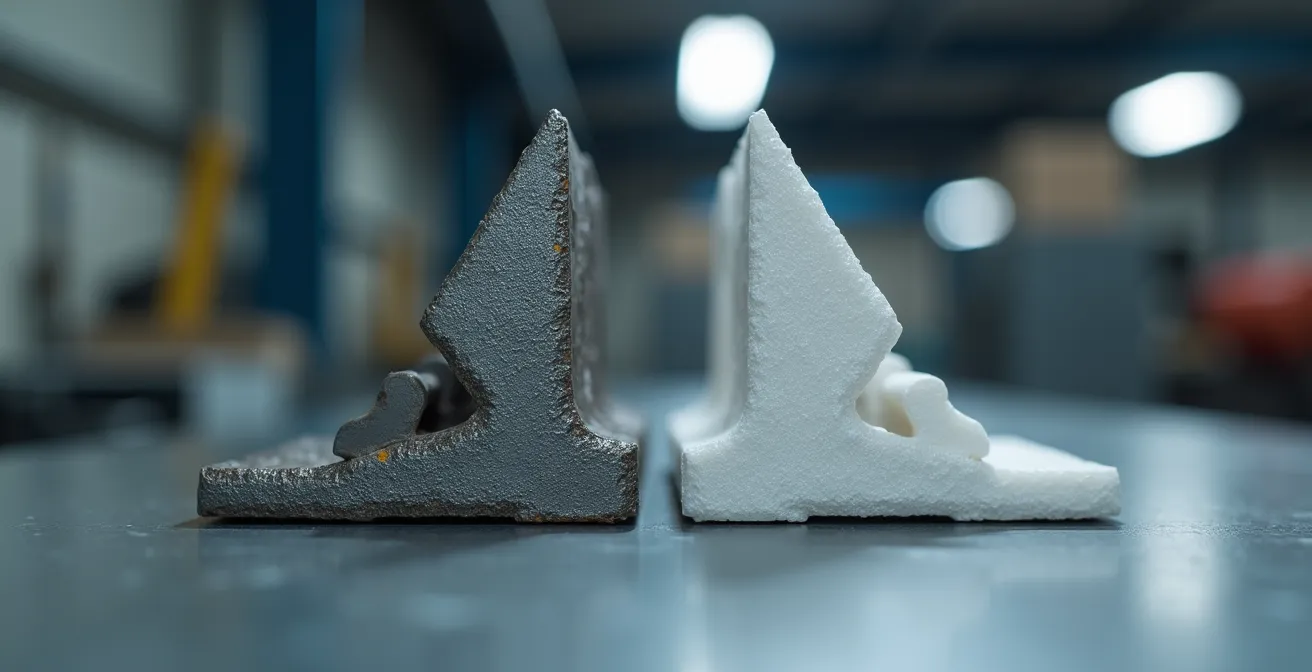
The second path, when a partnership isn’t feasible, is to reverse engineer a part to be a functionally equivalent replacement. This is a critical legal and engineering distinction. You are not creating a 1:1 copy. Instead, you are designing a new part that serves the exact same function—it has the same mounting points, fits in the same space, and meets the same performance specifications—but does not copy the OEM’s protected design. This often involves simplifying the geometry or changing non-critical features while preserving the essential functional interfaces.
Case Study: The Whirlpool Digital License Partnership
To tackle the inefficiency of its spare parts supply chain, appliance giant Whirlpool partnered with Spare Parts 3D. Instead of illegally copying parts, they embarked on a project to systematically digitize Whirlpool’s extensive back-catalogue. A selection of 150 parts was identified, and for each one, the Spare Parts 3D team tested various 3D printing technologies and materials to find the optimal production method. This collaborative approach allows Whirlpool to authorize the on-demand production of obsolete parts, legally and efficiently, ensuring customers can get replacements for older appliances without Whirlpool having to maintain a massive physical inventory.
SLA vs SLS: which technology delivers better surface finish for client demos?
Not all spare parts are functional components hidden inside a machine. Sometimes, you need to produce high-fidelity models for client demonstrations, trade show displays, or ergonomic evaluations. In these cases, the primary driver isn’t mechanical strength but aesthetic quality and surface finish. For these applications, two polymer-based technologies, Stereolithography (SLA) and Selective Laser Sintering (SLS), are top contenders.
SLA works by using an ultraviolet laser to cure liquid photopolymer resin layer by layer. The result is a part with an exceptionally smooth, almost glass-like surface finish and very fine detail resolution, making it ideal for visual prototypes that need to look like a finished product. SLS uses a laser to sinter powdered nylon, creating parts that are tough and durable. However, their native surface finish is slightly rough and matte, with a grainy texture.
While SLS parts can be post-processed (through sanding, tumbling, or vapor smoothing) to achieve a smoother finish, SLA provides a superior out-of-the-box appearance. This makes it significantly faster for producing one-off demo models where visual appeal is paramount.
The final finish is often more dependent on post-processing techniques like vapor smoothing, sanding, and painting than the native technology.
– Formlabs Engineering Team, 3D Printing Surface Finish Guide
The choice ultimately depends on the demo’s purpose. If the goal is purely to showcase form and aesthetics, SLA is the clear winner. If the demo involves handling the part and testing its feel or durability, the robustness of SLS might be preferable, even if it requires extra finishing steps.
| Criteria | SLA | SLS |
|---|---|---|
| Native Surface Finish | Smooth, glossy | Slightly rough, matte |
| Post-Processing Required | Minimal – curing, support removal | Moderate – powder removal, smoothing |
| Material Feel | Rigid but brittle | Durable, flexible options |
| Fine Detail Resolution | Excellent (25-50 microns) | Good (80-120 microns) |
| Speed for Demo Parts | Fast (hours) | Moderate (overnight) |
3D printing vs CNC machining: which is faster for validating custom jigs?
Beyond spare parts, a digital manufacturing strategy can revolutionize the creation of custom tools, jigs, and fixtures used on the production line. When validating a new custom jig, speed is everything. The faster you can get a physical tool into the hands of an operator for testing, the faster you can optimize your assembly process. The traditional method is CNC machining, but for speed and iteration, 3D printing often holds a decisive advantage.
CNC machining is a subtractive process that carves a part from a solid block of metal or plastic. It produces extremely strong and precise parts, but the process has significant setup time. A programmer must create the toolpaths, the machine must be prepared, and the block of material must be fixtured. This can take days before the first chip is even cut. While the machining itself might be fast, the total lead time for a single custom jig can be lengthy.
3D printing, an additive process, goes directly from a CAD file to a physical part with minimal setup. This allows for unparalleled iteration speed. You can design a jig in the morning, print it overnight, and have it on the factory floor for testing the next day. If the operator finds a flaw, you can modify the CAD file and print a new version that same day. This ability to produce multiple design variations in the time it takes to set up a single CNC job is a game-changer for process optimization.
The choice between the two depends on a few key factors:
- Geometric Complexity: Simple, blocky jigs with basic holes are often faster and cheaper to CNC. Jigs with complex, ergonomic contours that perfectly match a part are much easier to 3D print.
- Iteration Needs: If you are certain the first design will be perfect, CNC is a viable option. If you anticipate needing several versions to get it right, 3D printing is unequivocally faster.
- Material Requirements: If the jig requires the strength of a specific metal alloy not available in 3D printing, CNC is the only choice. However, many jigs can be made from durable polymers like Nylon or PETG, which are perfect for 3D printing.
Key Takeaways
- Inventory is a liability: Shift your mindset from viewing stocked parts as assets to seeing them as escalating costs due to storage, risk, and obsolescence.
- Strategy over technology: A successful program starts with a rigorous economic triage to identify high-impact parts, not with the printer itself.
- Manage the risks: A professional approach requires proactively mitigating engineering risks like anisotropy and navigating intellectual property laws through partnership or functional equivalence.
Rapid Prototyping: How to Move from CAD to Physical Test in Under 48 Hours?
The ultimate expression of a digital inventory strategy is true rapid prototyping—the ability to conceive a part, produce it, and have it in hand for physical testing in less than 48 hours. This agility can mean the difference between a machine being down for a month versus a few days, or winning a new contract by presenting a physical prototype while competitors are still sending drawings. This speed is not magic; it’s the result of a streamlined workflow and choosing the right technologies.
To achieve this, focus on technologies with minimal programming and setup, such as FDM, SLA, or Multi Jet Fusion (MJF), which can often run “lights-out” overnight without supervision. The process of going from a digital file to a physical part can be broken down into a compressed timeline.
The real-world impact of this speed is staggering. In one instance, Moog’s aircraft maintenance division was able to produce a critical part on-site while a plane was en route. The part was replaced within 30 minutes of the aircraft landing, avoiding what Moog estimated would have been a 44-day lead time and $30,000 in lost revenue had they used traditional sourcing methods. This is the power of a mature digital manufacturing workflow.
Here is a practical workflow to achieve a 48-hour turnaround:
- Hour 0-2: Finalize CAD and Export. Lock the design and export it as a print-ready file format like STL or 3MF. Ensure the model is watertight and free of errors.
- Hour 2-4: Optimize for Speed. In the slicer software, orient the model to minimize build height and support structures. Consider hollowing the model and using an infill pattern to reduce material and print time.
- Hour 4-24: Lights-Out Printing. Upload the file to an in-house printer or an on-demand manufacturing service. Start the print job to run overnight.
- Hour 24-36: Post-Processing. Once the print is finished, remove it from the build plate. Perform necessary post-processing like support removal, cleaning (for resin prints), or powder removal (for SLS).
- Hour 36-48: Verification and Shipping. Conduct a quick quality check to verify critical dimensions. If using an external service, this is when the part is packaged and sent via express shipping to its final test location.
Start today by applying the 5-point audit to a single category of your slow-moving inventory. The insights you gain will be the first step toward transforming your costly warehouse into a lean, agile, and highly responsive digital supply chain.